



Granny Unblocked Online – Play Free Horror Escape Game






Granny Unblocked Online – Play Free Horror Escape Game
Granny drops you into a locked house where every creak matters. The game on this page lets you jump straight into that tense hide-and-escape loop, but the real challenge is learning when to move, when to stay quiet, and which clue matters next. If you like horror games built around stealth, puzzle solving, and last-second escapes, Granny is the kind of browser game that can pull you in fast.

Contents
hide
About Granny
Granny is a first-person horror escape game built around one simple idea: you are trapped, Granny can hear you, and the house is full of objects that might help or betray you. Instead of relying on fast combat, the game turns ordinary actions like opening doors, dropping items, or crossing a noisy floor into risky decisions.
That is a big reason people keep searching for Granny Unblocked. They are usually looking for the familiar escape-house experience in a browser, especially on school laptops, Chromebooks, or quick desktop sessions where instant play matters more than setup. It suits players who enjoy suspense, trial and error, hidden-object puzzles, and a slow-burn kind of pressure rather than action-heavy horror.
What the gameplay feels like
Each run is a mix of scouting, memory, and nerve. You explore bedrooms, hallways, hidden spaces, and locked routes while collecting tools that open new parts of the house. A key might unlock a drawer, a tool might remove an obstacle, and one small discovery can change the path of your escape.
The tension comes from sound and timing. Granny reacts to noise, so even a dropped item can ruin a safe moment. Good runs usually happen when you move with a plan, remember where useful objects were found, and retreat before greed gets you caught. That steady push between curiosity and caution is what makes Granny memorable within the horror puzzle genre.
Where you can play Granny
On this page, Granny is available to play in your browser through the embedded game window near the top. That makes it easy to start on a desktop or laptop without going through a long install process.
Browser performance on phones and tablets can vary depending on the specific embed, screen size, and how the touch controls are mapped. For players who want the dedicated mobile app version of the same game title, official Android and iPhone listings also exist, which are covered below.
How to play Granny
The main goal is to escape the house before you run out of chances. You are not trying to fight through the house room by room. You are trying to survive long enough to gather the right items, unlock the right obstacles, and slip out before Granny stops you.
- Start by checking nearby drawers, shelves, and corners for anything useful.
- Listen closely after every action, because noise can bring Granny into your area.
- Pick up tools and keys that open new rooms, containers, or escape-route parts.
- Hide under beds or inside wardrobes when Granny gets too close.
- Memorize the house layout so you can move faster on later attempts.
- Work toward an exit route by solving linked puzzles instead of wandering without a plan.
Controls
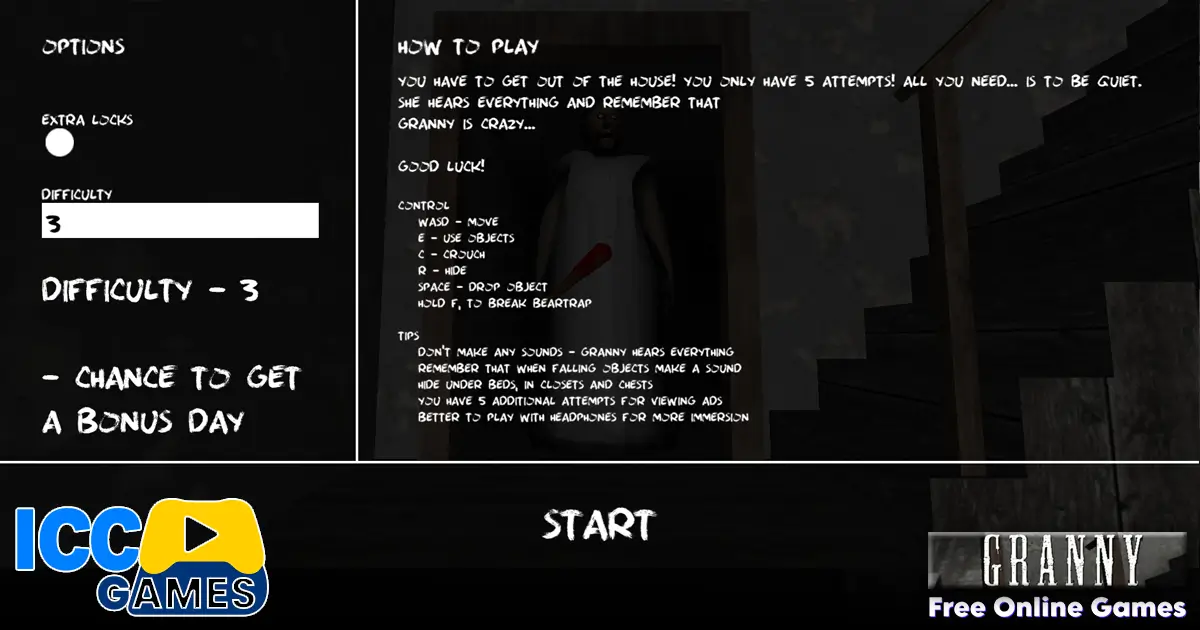
Browser versions of Granny can vary a little, but most desktop builds use a familiar keyboard-and-mouse setup:
- Move: W, A, S, D
- Look around: Mouse
- Interact / pick up: E or left click, depending on the build
- Crouch: C
- Hide / unhide: R in many browser PC builds when near a bed or wardrobe
- Drop item: Space in many PC-style versions
- Pause: Escape
On touch devices, controls are usually adapted into on-screen movement and action buttons. If the browser build on your device feels awkward, the official mobile apps are the better fit.
Tips that help in Granny
- Do not rush the first rooms. Early mistakes usually cost more than early progress helps.
- Use sound on purpose. Sometimes making noise in one place can pull Granny away from where you actually want to go next.
- Learn the house in layers. First remember safe hiding spots, then item locations, then puzzle order.
- Carry only what matters. Wandering around with the wrong item wastes time and can create extra risk.
- Back away before panic starts. In Granny, one calm retreat is often smarter than trying to force progress.
- Replay with better routing. The game gets easier when you stop exploring randomly and start moving with a sequence in mind.
Features of Granny
- First-person horror built around stealth and escape
- A house full of locked paths, hidden items, and puzzle pieces
- Enemy behavior tied closely to sound and player movement
- Hiding spots such as beds and wardrobes
- Multiple difficulty settings in the original game, including Practice and harder modes
- A short-session structure that works well for repeat attempts
- Strong suspense without needing constant combat
Download Granny on Android and iOS
If you want the official mobile app version of Granny, the exact same game title is available on both major mobile stores. That is the better option for players who prefer dedicated touch controls and a native app experience.
- Android: Granny on Google Play
- iPhone / iPad: Granny on the App Store
If you just want a quick session without installing anything, the browser version on this page is the faster way to jump in.
Similar games to Granny
- Granny: Chapter Two – another escape-focused horror game with the same hide, listen, and survive style.
- Granny 3 – a stronger fit for players who want more of the same spooky chase-and-puzzle tension.
- Scary Teacher 3D – lighter in tone, but still built around stealth, timing, and sneaky movement.
- Under the Grave – a good pick if you want another dark survival experience with pressure and danger.
Watch Granny Gameplay
Want to see how the game works before you start? This gameplay video gives you a quick look at the action, controls, and spooky pace of the game.
Watching a gameplay video can help new players understand the house layout, the stealth rhythm, and how quickly a noisy mistake can turn into a failed escape.
FAQ about Granny
What is Granny Unblocked?
Granny Unblocked usually means a browser-playable version of Granny that people can access without installing the mobile app first. Most players looking for it want the same stealth-horror idea in a faster, more convenient format.
Can you play Granny on a Chromebook?
Yes, browser versions are popular on Chromebooks because they are easy to launch. Performance depends on the specific build and the device, but that is one reason the game is often searched with terms like unblocked or online.
How do you win in Granny?
You win by finding the right items, unlocking the needed route, and escaping the house before you run out of chances. The trick is not speed alone. It is careful movement, puzzle order, and staying quiet.
Is Granny more about horror or puzzles?
It is both, but the puzzle side matters more than many new players expect. The horror creates pressure, while the real progress comes from exploration, item use, and learning how the house connects.
Does Granny have different difficulty modes?
Yes. The original game includes multiple difficulty options, including Practice along with harder settings. These change how forgiving the experience feels and how dangerous Granny becomes.
Is Granny too scary for younger kids?
That depends on the child. There is suspense, chase pressure, and jump-scare energy, so it can feel intense even without heavy action. Parents should treat it more like spooky stealth horror than a light puzzle game.
Can you play Granny on mobile too?
Yes. Granny has official Android and iPhone versions, so players who prefer touch controls can use the mobile apps instead of the browser version.
Conclusion
Granny still works because the fear is tied to gameplay, not just spooky visuals. Every drawer, hallway, and dropped object can change your run, which makes even short sessions feel tense and memorable. If you want a browser horror game that rewards patience, observation, and a cool head, the playable version on this page is an easy place to test your escape skills.